
How to Withdraw Money from Fly Chess Pro: Complete Guide 2026
Want to withdraw money from Fly Chess Pro but are unsure where to start? Before submitting a request, check your available balance, review the withdrawal conditions, and confirm that your payment details are correct. The process may vary depending on the app version and the options available in your account.
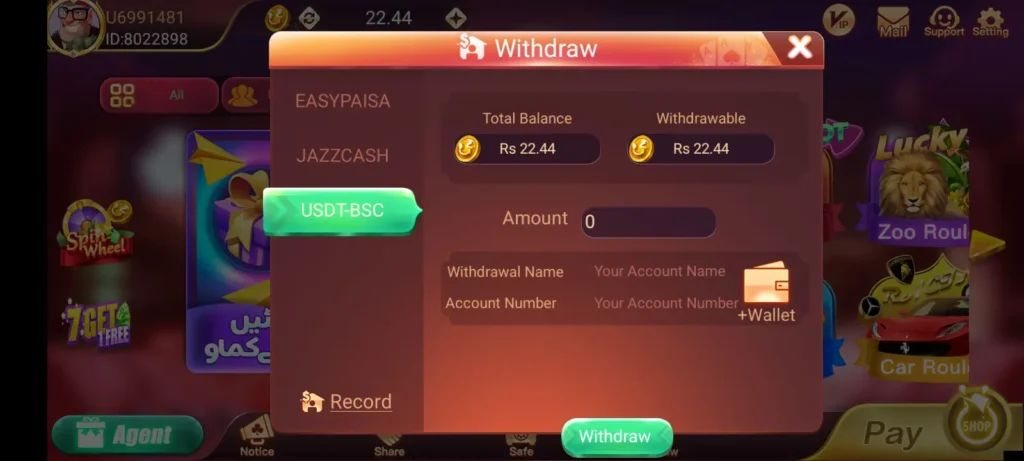
What to Check Before Withdrawing Money
A little preparation can help you avoid common payment problems. Open your Fly Chess Pro account and review these details before proceeding:
- Available balance: Check whether the amount is eligible for withdrawal.
- Payment information: Make sure your receiving account details are accurate.
- Withdrawal limits: Review any minimum or maximum amount shown in the app.
- Account verification: Check whether the platform requires additional verification.
- Bonus conditions: Promotional credits may have separate restrictions and may not be withdrawable.
These conditions can vary, so rely on the rules displayed by the platform rather than assumptions from another website.
How to Withdraw Money on Fly Chess Pro
Step 1: Log In to Your Account
Open Fly Chess Pro and sign in using your registered details. If you cannot access your account, resolve the login issue before starting a withdrawal.
Step 2: Open the Wallet or Withdrawal Page
Look for a section labelled Wallet, Withdraw, Cash Out, or a similar term. The wording may differ between versions of the app.
Step 3: Choose an Available Payment Method
Review the payment options shown on the withdrawal screen. Select a method that you can access and that supports withdrawals on your account. Do not assume that JazzCash, Easypaisa, or bank transfers are available unless the app confirms them.
Step 4: Enter the Withdrawal Amount
Type the amount you want to request, staying within the limits displayed on the screen. Check whether any fees or other conditions apply before continuing.
Step 5: Confirm Your Payment Details
Carefully review the receiving account information. Even a small mistake may cause a transaction to fail or require additional investigation.
Step 6: Submit and Track Your Request
Confirm the request and save its transaction reference, if provided. Then open your transaction history to monitor the status. Keep the reference until the payment has been resolved.
Why Is My Fly Chess Pro Withdrawal Pending?
A pending withdrawal can have several possible explanations. The payment may still be processing, account verification may be incomplete, or the receiving details may need checking. There could also be a delay with the payment provider.
Start by reviewing the transaction status and any messages in your account. If the stated processing period has passed, contact verified customer support with your transaction reference. Do not submit repeated requests without checking what happened to the original one.
How to Fix a Failed Withdrawal
If your request shows as failed, read the error message before trying again. Check the receiving details, review the withdrawal rules, and confirm whether the platform requires any additional steps.
If money was deducted but has not reached your account, save your payment receipt and contact the platform through a verified support channel. Avoid sending another payment simply to recover the first transaction.
Important Safety Tips for Withdrawals
Protect your money and account information throughout the process. Never share your password, one-time password (OTP), wallet PIN, or banking credentials with another person.
Be cautious if an unofficial agent asks you to deposit extra money to unlock a withdrawal or promises guaranteed returns. Verify any payment request independently before acting on it.
Also, remember that money used in real-money gaming can be lost. Do not use funds needed for household expenses, bills, or other essential commitments.
Final Words
Withdrawing money from Fly Chess Pro involves checking your eligible balance, reviewing the available payment methods, confirming your details, and tracking the request. The exact procedure, withdrawal limits, and processing times depend on the platform’s current rules.
Because the specific withdrawal system has not been independently verified, check the instructions inside your own app before making a financial decision. If a payment is delayed, keep your transaction records and seek help through a verified support channel.
Frequently Asked Questions
How do I withdraw money from Fly Chess Pro?
Log in, open the withdrawal section, review the available payment methods, enter an eligible amount, and confirm your details. Follow the instructions shown in your version of the app.
Why is my Fly Chess Pro withdrawal pending?
Possible reasons include payment processing, verification requirements, incorrect details, or provider delays. Check your transaction history for the actual status.
Can I withdraw money through JazzCash or Easypaisa?
Only if the withdrawal screen explicitly supports the payment method. Check the current options in your account before submitting a request.
What should I do if my withdrawal fails?
Review the error message and payment details. If money has been deducted, save the transaction reference and contact verified support before making another request.
Is Fly Chess Pro withdrawal guaranteed?
No withdrawal should be considered guaranteed without reliable confirmation of the platform’s terms and the status of your transaction. Always understand the risks before participating in real-money games.